
Email migration across multiple systems is not always straightforward. People moving from Mozilla Thunderbird or other EML-supported email clients to Microsoft Outlook frequently search for a trusted method to move their previous messages. Moving hundreds or thousands of email files manually can be time-consuming and increases the risk of losing vital data.
A specialized converting tool can simplify this process. GainTools EML to PST Converter is created to allow users to convert EML files to Outlook-supported PST format. But is it worth using? Is there enough value in it? Let's see how it works, benefits, limitations, and suitability for different users.
What Is GainTools EML to PST Converter?
EML and PST are two distinct ways to store emails. EML files usually retain a single email message, but PST files may include several Outlook objects including emails and their attachments.
The program converts EML to PST, allowing users to access their existing email archives in Microsoft Outlook. It might be handy for people transitioning between email clients, professionals maintaining older communication and companies combining stored messages.
The main goal is to simplify email migration so users don't have to convert each message manually.
Key Features to Consider
You should know what an email migration program can do and if its features are right for you before selecting one.
1. EML File Conversion
The main purpose is to transfer communications in EML format to PST files. This is useful for people who want to make their existing email archives ready to use in Microsoft Outlook.
2. Multiple File Handling
Processing numerous email files at once can save time, especially with big collections. Users should evaluate the batch processing options offered before buying the software.
3. Email Information Preservation
Keeping original email information during migration is important. Crucial elements include sender and recipient addresses, subject lines, message text, dates and attachments. Users should examine these parts after conversion to ensure their accuracy.
4. Organize Folders
When moving years of business or personal communication, email organization becomes critical. Verify that the program maintains the original folder structure during conversion.
5. Easy-to-Use Process
A straightforward interface helps non-technical people to go through the transfer procedure easily. Easy file selection, destination settings, and conversion options reduces the complexity.
How Does the Conversion Process Work?
The whole conversion procedure is composed of a few steps:
Download and run the software.
Choose the EML files or source folder to transfer.
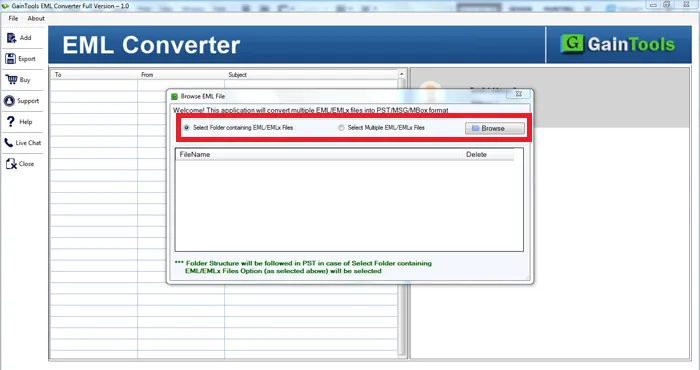
Preview the loaded messages.
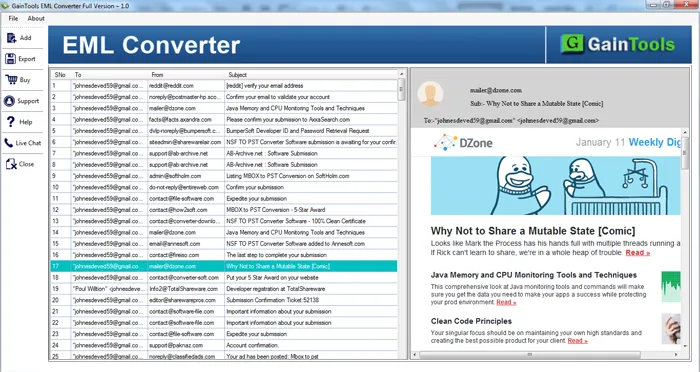 Select PST as the export format.
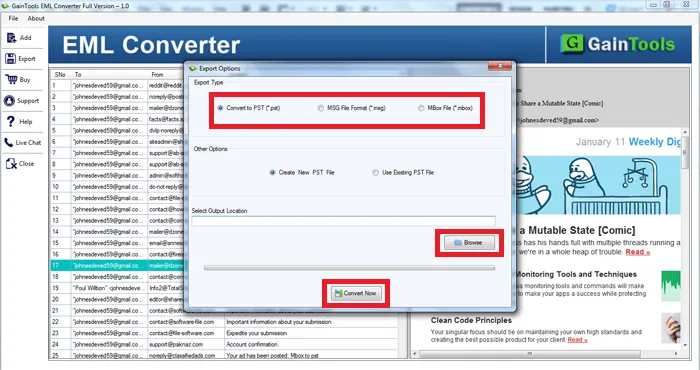
Choose a destination folder to save the transformed data.
Initiate the conversion procedure.
Open the resultant PST file in Microsoft Outlook and check the moved data.
The specific settings are different on the version installed. It is preferable to begin by examining a small sampling of messages before analyzing a whole email archive.
Advantages for Individual and Business Users
The main benefit of specialist migrating software is convenience. Instead of processing single messages individually, customers can process their entire email archives in a single procedure.
It can also help individuals migrating from Thunderbird or other EML-compatible apps to Outlook. The older emails are easier to view since the messages are saved in the familiar Outlook data format.
This strategy might be helpful for businesses who are consolidating employee email archives, preserving old conversations, or migrating to a Microsoft-based email environment.
But the real advantages are determined by the quality of conversion and how well it works with the user’s current configuration.
Limitations to Check Before Purchasing
While advanced software might make transfer easier, customers should think about a few practical points.
First, check the limitations of the trial version. Some trial software limits the quantity of files or messages that can be converted.
Second, check whether your Windows environment and version of Outlook are compatible. Not every program supports all configurations.
Third, think about performance when dealing with massive email collections. Think about conversion speed, attachment handling, memory needs, and PST file integrity.
Above all, before you delete the original EML files, make sure to examine the converted data. Review crucial messages, attachments, timestamps, folder configurations, etc., to make sure nothing critical is missing.
Is It Worth Using?
If you want to move email archives to Microsoft Outlook, you should evaluate the GainTools EML to PST Converter. It will be valuable to you based on how well it processes your files, whether it supports your system and if the license terms are within your budget.
Individual users with multiple EML files can appreciate the convenience of a dedicated conversion process. Companies and IT experts should do a comprehensive trial utilizing representative mailbox data before using it on a large scale.
Final Verdict
Selecting email conversion software is more than a feature list comparison. When deciding which one to use, reliability, interoperability, convenience of use, and data preservation should be taken into consideration.
This program might be a reliable solution for people who want to transfer EML-based email collections to Outlook. So, if you want to buy it, you must try the trial version, inspect the output PST file, and also check the available license choices.
A close look can help you determine whether the program really suits your email migration requirements.
Comments (0)
Want to join the discussion?
Log In to Comment